
• Shopping Cart Shopping Cart
    0Shopping Cart
Mandi Stanley
  • High-Content Keynotes
  • Power Programs
  • Virtual Classroom
  • Clients Speak Out
  • Blog & Vlog
  • Meet Your Presenter
  • Contact
  • Menu Menu
  • Link to LinkedIn
  • Link to X
  • Link to Mail

What If Two People Begin Talking at Once in Virtual Meetings?

June 24, 2020/in Virtual Meetings, Virtual presentations/by Mandi Stanley

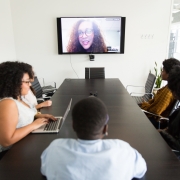
Last week during a customized session of The No-Panic Plan for Virtual Presenters webinar, a participant shared this question in the chatbox. We discussed solutions during the call for this commonplace occurrence.

Question: Are there any tips for how to handle two people speaking at once in a virtual meeting? It seems as if they inevitably both say, “No, you go ahead,” and then both start talking at the same time again and/or no one speaks up and it’s a complete awkward silence. Is there any way to avoid this?

Answer: This invariably happens, but presenters proactively can take steps to prevent meeting attendees from stepping on each other and talking at the same time:

  • If you are the presenter, ask another person to serve as a moderator. Those are two separate roles. The moderator will open the floor for comments and questions at regular intervals. I recently used this approach for a meeting during which I presented the information and a moderator named Ken funneled the questions to me. People commented later how fluidly that approach worked.
  • Encourage participants to use the chat function. Again, it’s a good idea to have a chat moderator. Sometimes it’s a challenge to be the one running the meeting AND monitoring the questions and comments in the chatbox.
  • Use the old-school hand wave. When you see someone raising their hand (assuming people use the video component for virtual meetings), call them by name to speak. This works if you see several people raising their hands simultaneously. Acknowledge you see them and will get to them.
  • If you are not using the video component, please ask everyone to say their name before commenting: for example, “This is Mandi, and I wanted to bring up another edit” or “This is George. I have a question about the new deadline.”
  • When you are not using the video component and two people chime in at once, if you know their names, you must step in as the leader to avoid that awkward silence. Say, “Benita, you go first, and then Cory, you may speak next.”

To customize a keynote or professional development session that will have your audience laughing and learning, contact Mandi Stanley.

Certified Speaking Professional Mandi Stanley works with business leaders who want to boost their professional image by becoming better speakers and writers through interactive high-content keynotes, breakout sessions, workshops, technical writing seminars, and fun proofreading classes. 

You might also like:

How Do You Handle Virtual Meeting Whiners?

Use this App to Capture Fresh Presentation Ideas

Presentation Closing Clunker: How to Avoid Going Over Time

Chris Montgomery on Unsplash

Tags: virtual meeting, virtual meeting moderator, virtual presentation
Share this entry
  • Share on Facebook
  • Share on X
  • Share on WhatsApp
  • Share on Pinterest
  • Share on LinkedIn
  • Share on Tumblr
  • Share on Vk
  • Share on Reddit
  • Share by Mail
https://mandistanley.com/wp-content/uploads/2020/06/chris-montgomery-smgTvepind4-unsplash-scaled.jpg 1920 2560 Mandi Stanley https://mandistanley.com/wp-content/uploads/2017/12/ms_logo_02.jpg Mandi Stanley2020-06-24 03:36:492020-06-22 16:37:17What If Two People Begin Talking at Once in Virtual Meetings?
You might also like
Virtual Presentations Tips: What NOT To Do
Take Care of Your Voice for Virtual Presentations
https://pixabay.com/photos/speak-talk-microphone-tin-can-can-238488/ One-Minute Technology Tips for Virtual Meetings
How To Produce a Professional Virtual Presentation
https://gratisography.com/photo/business-cat/ Assess Your Zoom Room
Photo by Christina @ wocintechchat.com on Unsplash How Do You Handle Virtual Meeting Whiners?


Recent Posts

  • Rock Your Résumé with One Easy Edit
  • Prefer Performance to Chronology in Your Résumé
  • Do I Really Need a Résumé Cover Letter?
  • Résumé Rewrite – vlog
  • Nix Nerves: Pro Tip 6

Categories

  • Closing Clunker
  • Email
  • Etiquette
  • Fun with Words
  • General
  • grammar
  • Grammar for Grown Ups Top 10
  • Interviews
  • Meetings
  • Personal
  • Presentations
  • Proofreading
  • Reading
  • Resume Writing
  • Speaking
  • Virtual Meetings
  • Virtual presentations
  • Wacky Word Choice
  • What's the Word
  • Working Remotely
  • Writing

Archive

  • May 2026
  • April 2026
  • March 2026
  • April 2025
  • February 2025
  • January 2025
  • November 2024
  • October 2024
  • July 2024
  • June 2024
  • May 2024
  • October 2023
  • August 2023
  • July 2023
  • May 2023
  • March 2023
  • January 2023
  • September 2022
  • August 2022
  • July 2022
  • June 2022
  • May 2022
  • April 2022
  • March 2022
  • February 2022
  • January 2022
  • December 2021
  • November 2021
  • October 2021
  • September 2021
  • August 2021
  • July 2021
  • June 2021
  • May 2021
  • April 2021
  • March 2021
  • February 2021
  • January 2021
  • December 2020
  • November 2020
  • October 2020
  • September 2020
  • August 2020
  • July 2020
  • June 2020
  • May 2020
  • April 2020
  • March 2020
  • February 2020
  • January 2020
  • December 2019
  • November 2019
  • October 2019
  • September 2019

Mandi Stanley Seminars, LLC

Post Office Box 1066
Madison, MS 39130-1066

Contact
NSA Certified Speaking Sprofessional
Lorman Distinguished Faculty Member

Free Download

Thank you for visiting my site!

In appreciation, download your free copy of The No-Panic Checklist for Presenters today.

Download Now
© Copyright 2018 - 2026. Mandi Stanley, CSP
  • Link to LinkedIn
  • Link to X
  • Link to Mail
Link to: Prioritize Performance in Your Résumé Link to: Prioritize Performance in Your Résumé Prioritize Performance in Your Résumé Link to: How to Organize the Talking Points of Your Live or Virtual Presentation Link to: How to Organize the Talking Points of Your Live or Virtual Presentation How to Organize the Talking Points of Your Live or Virtual Presentation
Scroll to top Scroll to top Scroll to top